


Color Shooter: Cube Sort
4.6156.00 Reviews
App Specs
- Version
- 1.2.7
- Updated On
- License
- Free
- Downloads
- 100,000+
- Developer
- Paxie Games
- Categories
- Puzzle
- Platform
- Android
Screenshots
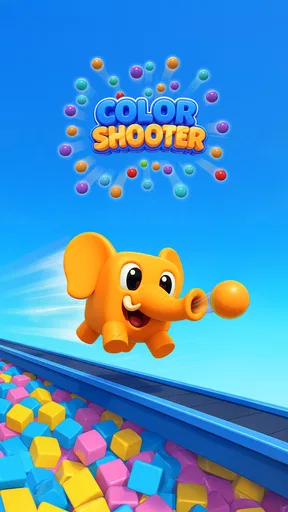
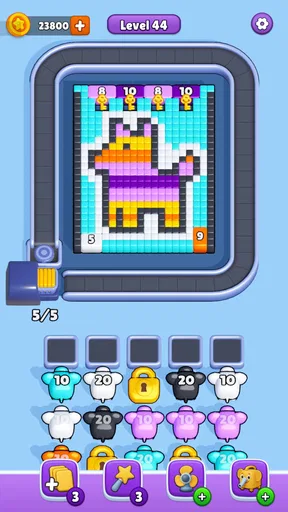
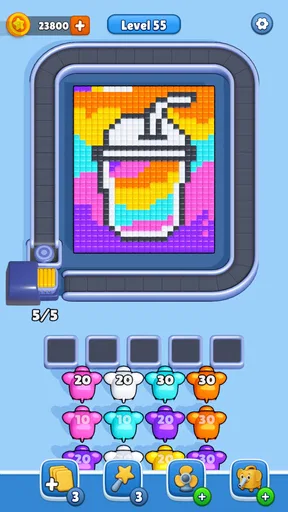
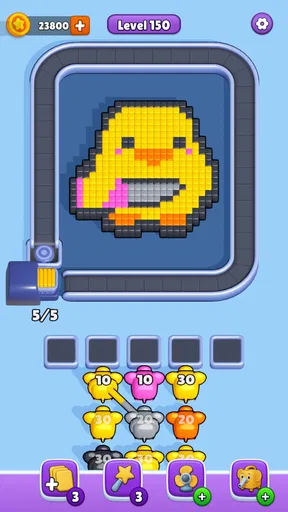
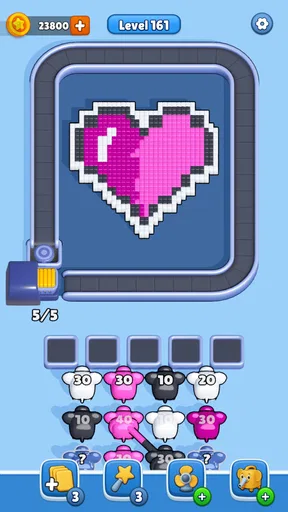
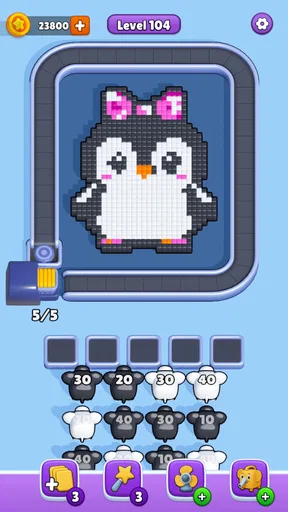
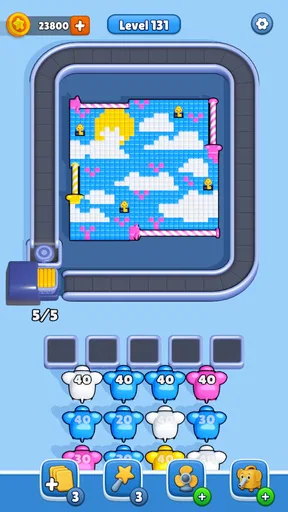
 Analysis by AppCompare
I look at a color-sorting puzzle partly through the small practical details: can I follow what is happening, can I play comfortably in the situation I’m in, and does the challenge feel worthwhile rather than tiring? Color Shooter: Cube Sort is a puzzle game from Paxie Games built around shooting colored cubes into matching slots. Its basic idea is easy to grasp, but the need to judge colors, aim, and respond as levels become harder gives each session more to think about than the bright presentation first suggests.
Who this puzzle suits
I’d point this game toward people who enjoy a focused, visual puzzle and want something they can pick up without learning a long set of rules. It may work especially well when you have a few spare minutes and want to concentrate on one clear task. The appeal is less about a sprawling story or a collection of modes and more about the direct loop of looking, choosing, and trying to place cubes correctly.
It is also a reasonable option for players who like a gradual rise in difficulty. A beginner can understand the color-matching premise quickly, while someone who enjoys planning can pay closer attention to the order and accuracy of shots. That does not mean every player will find the later challenge relaxing: once the pace or complexity asks for more concentration, it may feel closer to a reflex puzzle than a quiet sorting activity.
What the numbers tell me
The game is free to install, has an Everyone age rating, and its average rating is 4.5 from around 3.4 thousand ratings. It has over 100 thousand installs, which suggests that this is a modestly established casual puzzle rather than an obscure one-off. I treat those figures as useful context, not a promise that its particular pace or visual style will suit every player.
It was released on December 4, 2025, and version 1.2.2 is the current version. The listed minimum operating system is Android 7.1, so it is worth checking that your device meets that requirement before you decide to play. Optional in-app purchases range from $1.99 to $99.99 per item. The game can be started without paying, but I’d be cautious about any purchase prompt and check the amount carefully before confirming one.
Playing and deciding whether it fits
I’d use this section to think about whether the game fits your own routine, rather than judging it only by how quickly its puzzle makes sense. A useful first session is a short one: notice whether the colors are easy to tell apart and whether aiming feels comfortable before deciding to keep playing. That practical check leads naturally to the question of how its presentation supports readability and navigation.
Readability and navigation
Ever feel like your brain needs a good workout, but you want it to be fun too? That's where Color Shooter: Cube Sort comes into play. This game has been my go-to for a while now, and I can't wait to share my thoughts with you. It's a puzzle game with a twist, perfect for those moments when you want to kick back and give your mind a little challenge.
Worth Reading Before You Choose

EA SPORTS FC Mobile 26 Is a Bigger Football Game, but It Takes Time

Flipboard Shows What News Apps Must Do Beyond the Feed

Switching to Android Auto Means Rethinking Your Driving Routine

Google Calendar Makes a Crowded Week Easier to Manage

Ludo King Makes the Most of the Minutes Between Plans

Baby Panda World Brings Quick Play to Modern Phones, but Its Game Library Feels Busy
When I first stumbled upon Color Shooter: Cube Sort, I was drawn in by its vibrant colors and straightforward concept. The game is all about sorting cubes by color, but don't let its simplicity fool you. It gets tricky as you progress, and that's where the fun begins. The interface is clean, and the controls are intuitive, making it easy to dive right into the action.
That simple presentation is useful when I return to a game after a break: I can focus on the cubes and the immediate decision rather than remembering a complicated set of rules. The main question to consider is whether the color distinctions remain comfortable for your eyes on your own screen. A bright palette can make pieces stand out, but color is also central to identifying a correct match, so anyone who finds similar hues difficult to distinguish may have a harder time than the straightforward controls suggest.
Motor and sensory considerations
The core of the game revolves around shooting cubes into the correct slots based on their colors. Sounds easy, right? Well, the levels get progressively harder, adding more colors and obstacles to the mix. The challenge lies in making quick decisions and aiming accurately. I found myself getting totally absorbed in trying to beat my previous scores, and that's what keeps me coming back for more.
There's also a satisfying rhythm to the gameplay. You get into a flow as you match colors and clear levels, and it's incredibly rewarding. The game encourages you to think strategically and plan your moves carefully, especially as the levels ramp up in difficulty.
For a more comfortable attempt, I’d play when I can give the screen a steady look instead of trying to make shots while walking or juggling another task. The combination of color judgment and aiming means that a rushed thumb movement can matter as much as a good plan. If you prefer puzzles that let you pause over each move without any pressure to react, a turn-based sorting game may be a better fit; this one’s appeal depends partly on the active shooting element.
Graphics and sound
The visuals are a standout feature. The colors are bright and pop off the screen, making each level a feast for the eyes. The animations are smooth, and there's a certain elegance to how the cubes move and interact. It's visually pleasing without being overly complicated, which I appreciate.
As for the sound, the game features a catchy background track that complements the gameplay perfectly. It's upbeat and energetic, keeping you in the zone as you sort those cubes. The sound effects are subtle but effective, adding to the overall immersive experience.
That combination makes the game feel lively, but it may not be ideal in every setting. In a waiting room, shared space, or quiet break, I’d keep the sound low or mute it if the device allows; the visual puzzle is the main draw, so I would not want the soundtrack to decide whether I can play. Bright animation can also be more stimulating than some people want during a wind-down moment. If you’re looking for a subdued, low-stimulation game before bed, a calmer visual style may suit you better.
Making a session work in everyday life
A realistic use for this kind of puzzle is a short wait with a clear stopping point: for example, I might open it while waiting for a takeaway order, play a level or two, then put the phone away when my turn comes. That is more practical than starting a long session when I need to be alert to people or announcements. If I have only a moment, I’d avoid beginning a level when I know I may have to stop mid-action; interruptions can break the concentration needed to aim carefully.
At home, I’d use it differently. A quieter stretch on the sofa gives me time to notice which colors and obstacles are coming up and to choose shots deliberately, rather than tapping through as quickly as possible. A useful personal rule is to slow down after a failed attempt and identify whether the problem was color recognition, timing, or aim. Treating each retry as a chance to change one decision is more satisfying than repeating the same rushed move and hoping for a different result.
Where it sits among puzzle games
Compared with familiar match puzzles, Color Shooter: Cube Sort puts more emphasis on sending pieces toward targets than on swapping tiles across a static board. That gives it a more physical, immediate feel: I’m not just spotting a combination but trying to direct a shot. Compared with a pure reflex arcade game, its color-matching and planning give each action a puzzle purpose. If you want calm, untimed organization, a classic cube or tile sorter may be the better choice; if you want a story, wordplay, or a deep strategic campaign, this is not trying to replace those experiences.
One trade-off is that the same straightforward loop that makes it easy to start can eventually feel repetitive if you need frequent changes of scenery or a lot of variety in how you solve puzzles. I’d recommend it most to someone who enjoys refining a small set of skills—recognizing colors, choosing a target, and improving aim—rather than someone who expects a new mechanic every few minutes. Its strongest comparison point is that direct, active feedback, not breadth.
Limits and purchase decisions
If you’re wondering whether you need to pay before you can enjoy it, the game is free to install, with in-app purchases available. I’d begin without spending and see whether the core puzzle holds my attention. Because individual purchases can vary widely in price, I’d read each prompt carefully and avoid treating an offer as necessary just because I’ve hit a difficult level. A purchase only makes sense if its specific benefit is clear to you and fits your budget.
There are other reasons to skip it. Players who need strong accessibility controls, explicit non-color cues, or a very slow pace should first decide whether the color-led, aiming-based action is comfortable for them. I can’t recommend it as a dependable option for every visual or motor need simply because its interface seems simple. Similarly, anyone who dislikes retrying a puzzle or wants a relaxing game with no pressure to aim may enjoy a conventional, untimed sorting alternative more.
Why You'll Love It
If you're a fan of puzzle games, this one’s a must-try. What sets it apart is its simplicity combined with a gradual increase in complexity. You get that satisfying "aha!" moment when you finally crack a level that's been stumping you. It’s perfect for short bursts of play or for those extended sessions when you just want to unwind.
The game is also great for all ages. Whether you're a kid looking for a fun challenge or an adult seeking a mental workout, Color Shooter: Cube Sort fits the bill. It fosters critical thinking and improves your reflexes, all while keeping you entertained.
I would still match that recommendation to the player rather than assume that an Everyone rating makes the experience equally accessible to everyone. For a family, the simple premise is easy to explain and can make it fun to take turns discussing which slot to target. For solo play, the gradual difficulty gives a reason to keep refining a plan. But a player who has trouble distinguishing colors, aiming on a touchscreen, or responding to a quick sequence may need a different puzzle style. The most useful test is a short, low-pressure session: if the colors are clear and the controls feel comfortable, the game’s central loop is easy to understand.
Final Thoughts
In a world where mobile games can often feel overwhelming with ads and complicated mechanics, Color Shooter: Cube Sort is a refreshing change. It’s straightforward, engaging, and most importantly, fun. I've thoroughly enjoyed my time with it, and I think you will too.
So, if you're on the hunt for a new game to add to your collection, give this one a shot. It’s sure to provide you with hours of entertainment and perhaps even a new favorite pastime. Happy gaming!
My inclusive verdict is positive but qualified: I like how quickly the game communicates its basic task, and the active color-and-aim loop gives the puzzle a distinct feel. Its most comfortable audience is someone who can see the color differences easily, enjoys touch-based aiming, and wants a compact challenge rather than a sprawling game. If those conditions fit you, it is worth trying without paying first; if they do not, a slower puzzle with less reliance on color or rapid aiming is a more considerate choice.
Pros
- Intuitive controls for easy gameplay.
- Visually appealing with vibrant colors.
- Quick load times and smooth performance.
- Frequent updates with new levels.
- No intrusive ads during gameplay.
Cons
- Limited levels can feel repetitive.
- Occasional glitches in color sorting.
- Requires internet for some features.
- In-app purchases can be pricey.
- Sound effects can become monotonous.
FAQs for Color Shooter: Cube Sort
What is the main objective of Color Shooter: Cube Sort?
Color Shooter: Cube Sort is a puzzle game where the objective is to sort and match colored cubes by shooting them into the correct stacks. The challenge increases as you progress through levels, requiring strategic planning and quick reflexes to ensure you place each cube correctly and advance to higher stages.
Is Color Shooter: Cube Sort suitable for all ages?
Yes, Color Shooter: Cube Sort is designed to be suitable for players of all ages. Its intuitive controls and engaging gameplay make it accessible to both younger players and adults who enjoy challenging puzzle games. The game does not contain any inappropriate content, making it family-friendly.
Does Color Shooter: Cube Sort require an internet connection to play?
No, Color Shooter: Cube Sort can be played offline. This allows players to enjoy the game anywhere, without the need for a continuous internet connection. However, an internet connection may be required for certain features like leaderboards or in-app purchases.
Are there in-app purchases in Color Shooter: Cube Sort?
Yes, Color Shooter: Cube Sort offers in-app purchases. These can include additional levels, power-ups, or cosmetic items. While the game can be enjoyed without any purchases, these options provide players with opportunities to enhance their gaming experience and personalize their gameplay.
How can I improve my skills in Color Shooter: Cube Sort?
To improve your skills in Color Shooter: Cube Sort, practice is key. Focus on improving your aim and speed, and plan your moves ahead. Paying attention to the color patterns and stacking strategies can help you progress through levels more efficiently. Watching tutorials or gameplay videos can also provide useful tips.


